---
title: Using the Filter by Date Function - Calendar Icon
description: Filter your records, tasks, or timesheets timeline by a custom or preset date range using the calendar icon in Resolution.
---
[Skip to content](https://support.resolutionapp.co.nz/tips-tricks/using-the-calendar-filter-by-date-function#main-content)
English - New Zealand
Show submenu for translations
[](https://www.resolutionapp.co.nz/)
- [Home](https://www.resolutionapp.co.nz/)
- [About us](https://www.resolutionapp.co.nz/about-us)
- [Testimonials](https://www.resolutionapp.co.nz/testimonials)
- [Events](https://www.resolutionapp.co.nz/events)
- [Help Centre](https://support.resolutionapp.co.nz/)
- [Request a demo](https://www.resolutionapp.co.nz/pricing#request-demo)
Open main navigation
Close main navigation
- [Home](https://www.resolutionapp.co.nz/)
- [About us](https://www.resolutionapp.co.nz/about-us)
- [Testimonials](https://www.resolutionapp.co.nz/testimonials)
- [Events](https://www.resolutionapp.co.nz/events)
- [Help Centre](https://support.resolutionapp.co.nz/)
- [Request a demo](https://www.resolutionapp.co.nz/pricing#request-demo)
- English - New Zealand
Show submenu for translations
- [Login](https://app.resolutionapp.co.nz/)
[Login](https://app.resolutionapp.co.nz/)
How can we help you?
- There are no suggestions because the search field is empty.
1. [Resolution Help Centre](https://support.resolutionapp.co.nz/?hsLang=en-nz)
2. [Tips & Tricks](https://support.resolutionapp.co.nz/tips-tricks?hsLang=en-nz)
# Using the Filter by Date Function - Calendar Icon
## Learn how to use the filter by date (calendar icon) to narrow down your timeline to a custom or preset date range across records, tasks, and timesheets.
### How to use the Calendar / Filter by Date
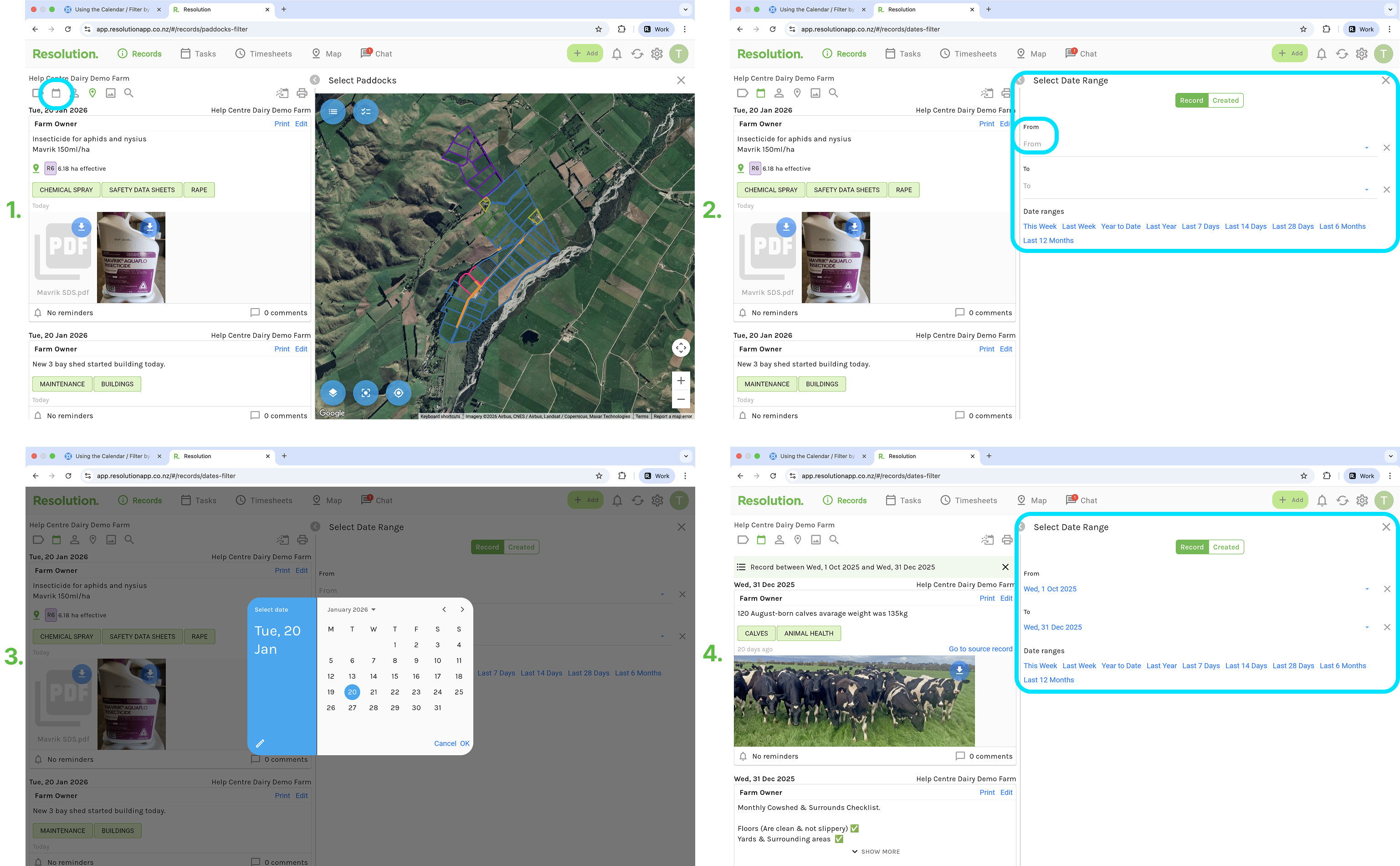
1. From the records, tasks or timesheets page, select the calendar icon.
2. You will have 2 or 3 options to select from at the top of the page **(this is explained below).**
3. You can select from a custom date range or a pre-set date range.
1. To select a custom date range, select a ‘From’ and ‘To’ date by using the drop down calendars to select the date required.
2. Choose from one of the preset date ranges.
4. Your timeline will now be filtered to only show entries that fall within your selected date range.
### Differences Between Records, Tasks and Timesheets Pages
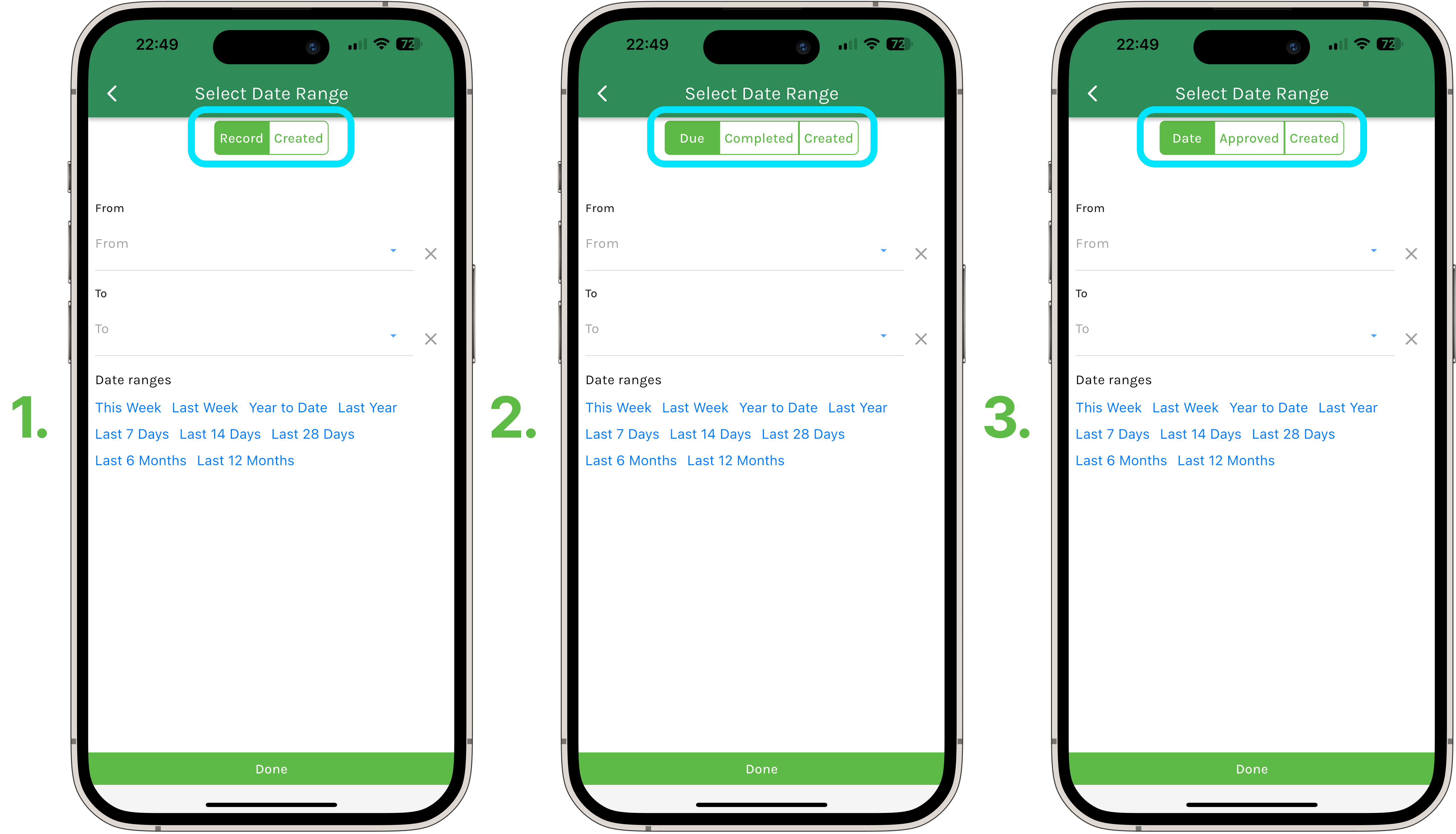
The filter options along the top of each of these sections (Records, Tasks and Timesheets) differ slightly. Below is an outline of what each of these options mean -
1. **Records Page**
1. Record: When the record was recorded, or for which day it applies.
2. Created: The day the record was actually created.
2. **Tasks Page**
1. Due: The day the task is due.
2. Completed: When the task was completed.
3. Created: The day the task was actually created.
3. **Timesheets Page**
1. Date: The day the timesheet was recorded, or for which day it applies.
2. Approved: The day the timesheet was approved.
3. Created : The day the timesheet was actually created.
### Related Articles
1. [How to Use Jump to Date Filter](https://support.resolutionapp.co.nz/tips-tricks/how-to-use-jump-to-date-filter?hsLang=en-nz)
2. [How to Quick Search when Filtering by Tags](https://support.resolutionapp.co.nz/tips-tricks/how-to-use-quick-search-when-filtering-by-tags?hsLang=en-nz)
3. [Match All Tags vs Match Any Tag](https://support.resolutionapp.co.nz/tips-tricks/match-all-tags-vs-match-any-tag?hsLang=en-nz)
4. [Long Press / Double Clicking Tags and Paddocks](https://support.resolutionapp.co.nz/tips-tricks/long-press-double-clicking-tags-and-paddocks?hsLang=en-nz)
- [Getting started](https://support.resolutionapp.co.nz/getting-started?hsLang=en-nz)
- [Base Map](https://support.resolutionapp.co.nz/base-map?hsLang=en-nz#main-content)
- [Farm Base Map Editor](https://support.resolutionapp.co.nz/base-map?hsLang=en-nz#farm-base-map-editor)
- [Export Map](https://support.resolutionapp.co.nz/base-map?hsLang=en-nz#export-map)
- [Settings](https://support.resolutionapp.co.nz/settings?hsLang=en-nz#main-content)
- [User Settings](https://support.resolutionapp.co.nz/settings?hsLang=en-nz#user-settings)
- [Notifications](https://support.resolutionapp.co.nz/settings?hsLang=en-nz#notifications)
- [Account Settings](https://support.resolutionapp.co.nz/settings?hsLang=en-nz#account-settings)
- [Farm Settings](https://support.resolutionapp.co.nz/settings?hsLang=en-nz#farm-settings)
- [Tags](https://support.resolutionapp.co.nz/tags?hsLang=en-nz)
- [Records](https://support.resolutionapp.co.nz/records?hsLang=en-nz)
- [Tasks](https://support.resolutionapp.co.nz/tasks?hsLang=en-nz)
- [Map Layers](https://support.resolutionapp.co.nz/map-layers?hsLang=en-nz)
- [Timesheets](https://support.resolutionapp.co.nz/timesheets?hsLang=en-nz)
- [Chat](https://support.resolutionapp.co.nz/chat?hsLang=en-nz)
- [Tips & Tricks](https://support.resolutionapp.co.nz/tips-tricks?hsLang=en-nz)
- [Contact Support](https://www.resolutionapp.co.nz/support)
[](http://resolutionapp.co.nz)
Copyright 2026 - Top Rail Limited | All rights reserved
×