---
title: How to Generate Timesheet Reports
description: Generate farm and user timesheet reports, select your date range, filter by approval status, and export to PDF, DOCX, or CSV.
---
[Skip to content](https://support.resolutionapp.co.nz/timesheets/how-to-generate-timesheet-reports#main-content)
English - New Zealand
Show submenu for translations
[](https://www.resolutionapp.co.nz/)
- [Home](https://www.resolutionapp.co.nz/)
- [About us](https://www.resolutionapp.co.nz/about-us)
- [Testimonials](https://www.resolutionapp.co.nz/testimonials)
- [Events](https://www.resolutionapp.co.nz/events)
- [Help Centre](https://support.resolutionapp.co.nz/)
- [Request a demo](https://www.resolutionapp.co.nz/pricing#request-demo)
Open main navigation
Close main navigation
- [Home](https://www.resolutionapp.co.nz/)
- [About us](https://www.resolutionapp.co.nz/about-us)
- [Testimonials](https://www.resolutionapp.co.nz/testimonials)
- [Events](https://www.resolutionapp.co.nz/events)
- [Help Centre](https://support.resolutionapp.co.nz/)
- [Request a demo](https://www.resolutionapp.co.nz/pricing#request-demo)
- English - New Zealand
Show submenu for translations
- [Login](https://app.resolutionapp.co.nz/)
[Login](https://app.resolutionapp.co.nz/)
How can we help you?
- There are no suggestions because the search field is empty.
1. [Resolution Help Centre](https://support.resolutionapp.co.nz/?hsLang=en-nz)
2. [Timesheets](https://support.resolutionapp.co.nz/timesheets?hsLang=en-nz)
# How to Generate Timesheet Reports
## Learn how to generate farm and user timesheet reports. You can include as many users as you want, select the date range and choose which file type to generate (PDF, DOCX, or CSV).
### Timesheet ‘Create’ and ‘Approve’ permissions in relation to generating reports
- If a user only has the timesheet ‘create’ permission enabled, they will only be able to generate timesheet reports for themselves.
- If a user has the timesheet ‘approve’ permission enabled, they will be able to generate timesheet reports for all farm users.
### Steps to Generate Timesheet Report
1. Go to timesheets page.
2. Select “Printer icon”.
3. Select the ‘Report Type’.
1. **Farm Report:** Generate a report for multiple users, you can select as many users as you wish to be included in this report. There are two icons on the top right of this user list. The one on the right allows you to select/de-selevt all users. The one on the left allows you to view users whose access has been revoked from your account.
2. **User Report:** Generate a report for one specific user.
4. Select the date range for the report.
5. Select which type of timesheets you wish to be included, you can toggle between only approved, or unapproved or to include both.
6. Choose the format of the report.
1. **PDF**: A simple pdf with tables and a tally at the bottom.
2. **DOCX**: A word document
3. **CSV**: A simple spreadsheet
4. **CSV Detailed**: A more detailed spreadsheet.
7. Select print.
You will then be sent an email when your report is ready to be downloaded, alternatively, you will be notified within the Resolution app when the report can be downloaded and viewed.
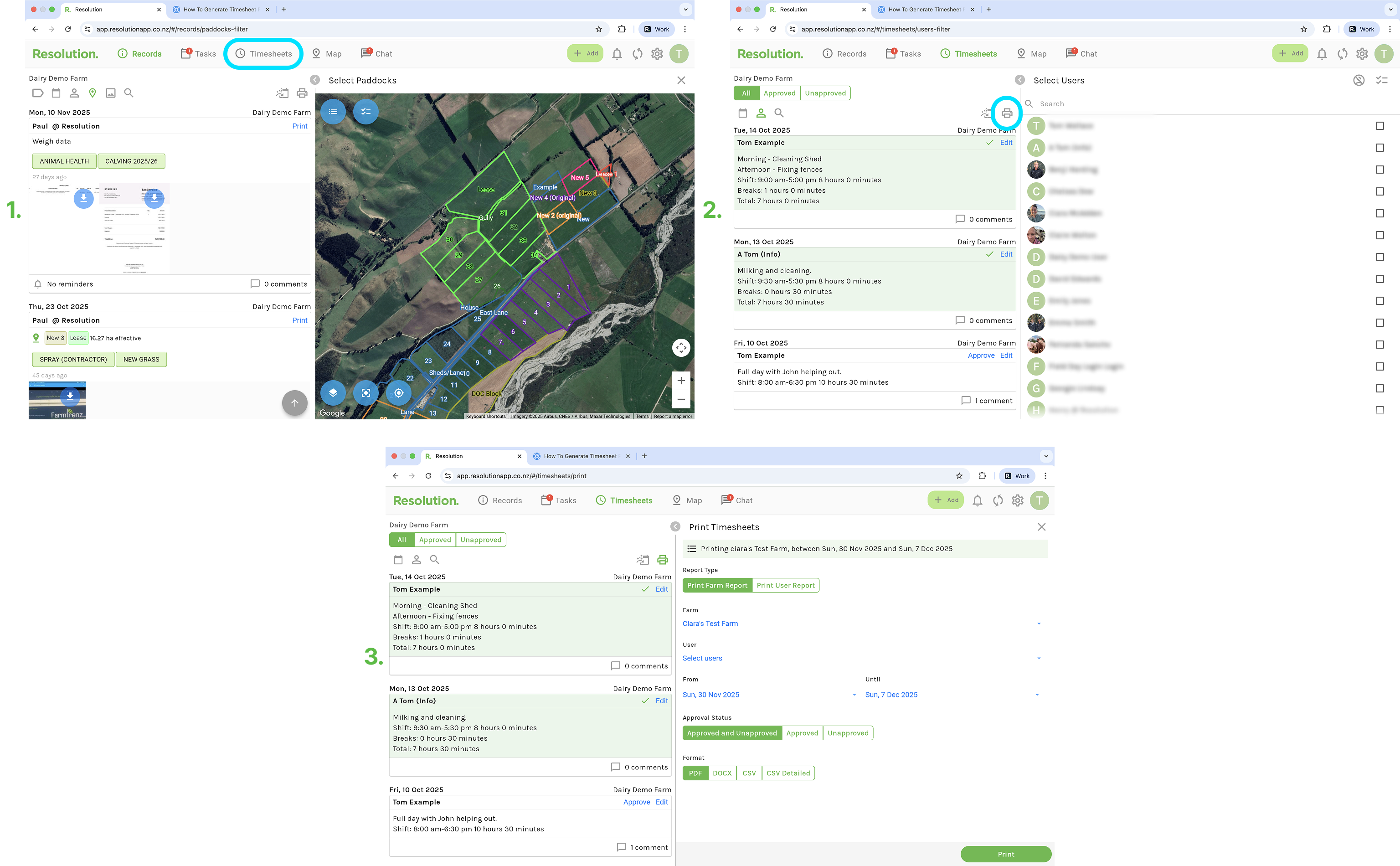
The steps to generate reports from your mobile app are the exact same as above.
### Related Articles
1. [How to Create a Timesheet](https://support.resolutionapp.co.nz/timesheets/how-to-create-a-timesheet?hsLang=en-nz)
2. [How to Approve Timesheets](https://support.resolutionapp.co.nz/timesheets/how-to-approve-timesheets?hsLang=en-nz)
3. [User Permissions](https://support.resolutionapp.co.nz/users/user-permissions?hsLang=en-nz)
- [Getting started](https://support.resolutionapp.co.nz/getting-started?hsLang=en-nz)
- [Base Map](https://support.resolutionapp.co.nz/base-map?hsLang=en-nz#main-content)
- [Farm Base Map Editor](https://support.resolutionapp.co.nz/base-map?hsLang=en-nz#farm-base-map-editor)
- [Export Map](https://support.resolutionapp.co.nz/base-map?hsLang=en-nz#export-map)
- [Settings](https://support.resolutionapp.co.nz/settings?hsLang=en-nz#main-content)
- [User Settings](https://support.resolutionapp.co.nz/settings?hsLang=en-nz#user-settings)
- [Notifications](https://support.resolutionapp.co.nz/settings?hsLang=en-nz#notifications)
- [Account Settings](https://support.resolutionapp.co.nz/settings?hsLang=en-nz#account-settings)
- [Farm Settings](https://support.resolutionapp.co.nz/settings?hsLang=en-nz#farm-settings)
- [Tags](https://support.resolutionapp.co.nz/tags?hsLang=en-nz)
- [Records](https://support.resolutionapp.co.nz/records?hsLang=en-nz)
- [Tasks](https://support.resolutionapp.co.nz/tasks?hsLang=en-nz)
- [Map Layers](https://support.resolutionapp.co.nz/map-layers?hsLang=en-nz)
- [Timesheets](https://support.resolutionapp.co.nz/timesheets?hsLang=en-nz)
- [Chat](https://support.resolutionapp.co.nz/chat?hsLang=en-nz)
- [Tips & Tricks](https://support.resolutionapp.co.nz/tips-tricks?hsLang=en-nz)
- [Contact Support](https://www.resolutionapp.co.nz/support)
[](http://resolutionapp.co.nz)
Copyright 2026 - Top Rail Limited | All rights reserved
×