
Contact Us

If you still have questions or prefer to get help directly from our support team, please contact support below.

Contact Support
  • Home
  • Pricing
  • About
  • Support
English (UK)
US English (US)
GB English (UK)
  • Home
  • Timesheets

How to Generate Timesheet Reports

Learn how to generate farm and user timesheet reports. You can include as many users as you want, select the date range and choose which file type to generate.

Written by Thomas Wallace

Updated at February 9th, 2026

Contact Us

If you still have questions or prefer to get help directly from our support team, please contact support below.

Contact Support
  • Getting Started
    Welcome Email and First Logging In Basic App Navigation Logging In as a New User
  • Base Map
    Farm Base Map Editor Export Map
  • Settings
    User Settings Notifications Account Settings Farm Settings
  • Tags
    Creating Tags Creating Tag Categories Editing Tags Deleting Tags Public vs Restricted Tags
  • Records
    Create a Record Edit a Record Copy a Record Delete Records Transfer Record to a Task Copy Records and Tasks to Another Farm How to Add a Reminder to a Record Commenting on Records How to Create and Print Reports
  • Tasks
    Create a Task Edit a Task Copy a Task Transfer Task to a Record Complete Tasks Delete a Task Copy Tasks and Records to Another Farm How to Add a Reminder to a Task Commenting on Tasks How to Create and Print Reports
  • Map Layers
    Create Basic Map Layers Edit Map Layers
  • Timesheets
    How to Create a Timesheet How to Approve Timesheets How to Generate Timesheet Reports
  • Chat
    Chat Full Walkthrough Getting Started (Chat) Chat Permissions Create New Chats Basic Chat Functions Chat Reactions Attach Records / Tasks to Chat and How to Create Records / Tasks from Chat How to Edit, Leave, Archive and Unarchive Chats
  • Tips & Tricks
    How to Navigate Between Multiple Farms How to Quick Search when Filtering by Tags Match All Tags vs Match Any Tag Long Press / Double Clicking Tags and Paddocks Using the Filter by Date Function - Calendar Icon How to Search for Keywords and Numbers How to Use Jump to Date Filter How to Print Farm Map
+ More

Table of Contents

Timesheet ‘Create’ and ‘Approve’ permissions in relation to generating reports. Steps to Generate Timesheet Report.

Learn how to generate farm and user timesheet reports. You can include as many users as you want, select the date range and choose which file type to generate. 


Timesheet ‘Create’ and ‘Approve’ permissions in relation to generating reports.

  • If a user only has the timesheet ‘create’ permission enabled, they will only be able to generate timesheet reports for themselves.
  • If a user has the timesheet ‘approve’ permission enabled, they will be able to generate timesheet reports for all farm users.


Steps to Generate Timesheet Report.

  1. Go to timesheets page.
  2. Select “Printer icon”.
  3. Select the ‘Report Type’.
    1. Farm Report: Generate a report for multiple users, you can select as many users as you wish to be included in this report. There are two icons on the top right of this user list. The one on the right allows you to select/de-selevt all users. The one on the left allows you to view users whose access has been revoked from your account.
    2. User Report: Generate a report for one specific user.
  4. Select the date range for the report.
  5. Select which type of timesheets you wish to be included, you can toggle between only approved, or unapproved or to include both.
  6. Choose the format of the report.
    1. PDF: A simple pdf with tables and a tally at the bottom.
    2. DOCX: A word document
    3. CSV: A simple spreadsheet
    4. CSV Detailed: A more detailed spreadsheet.
  7. Select print.

You will then be sent an email when your report is ready to be downloaded, alternatively, you will be notified within the Resolution app when the report can be downloaded and viewed.
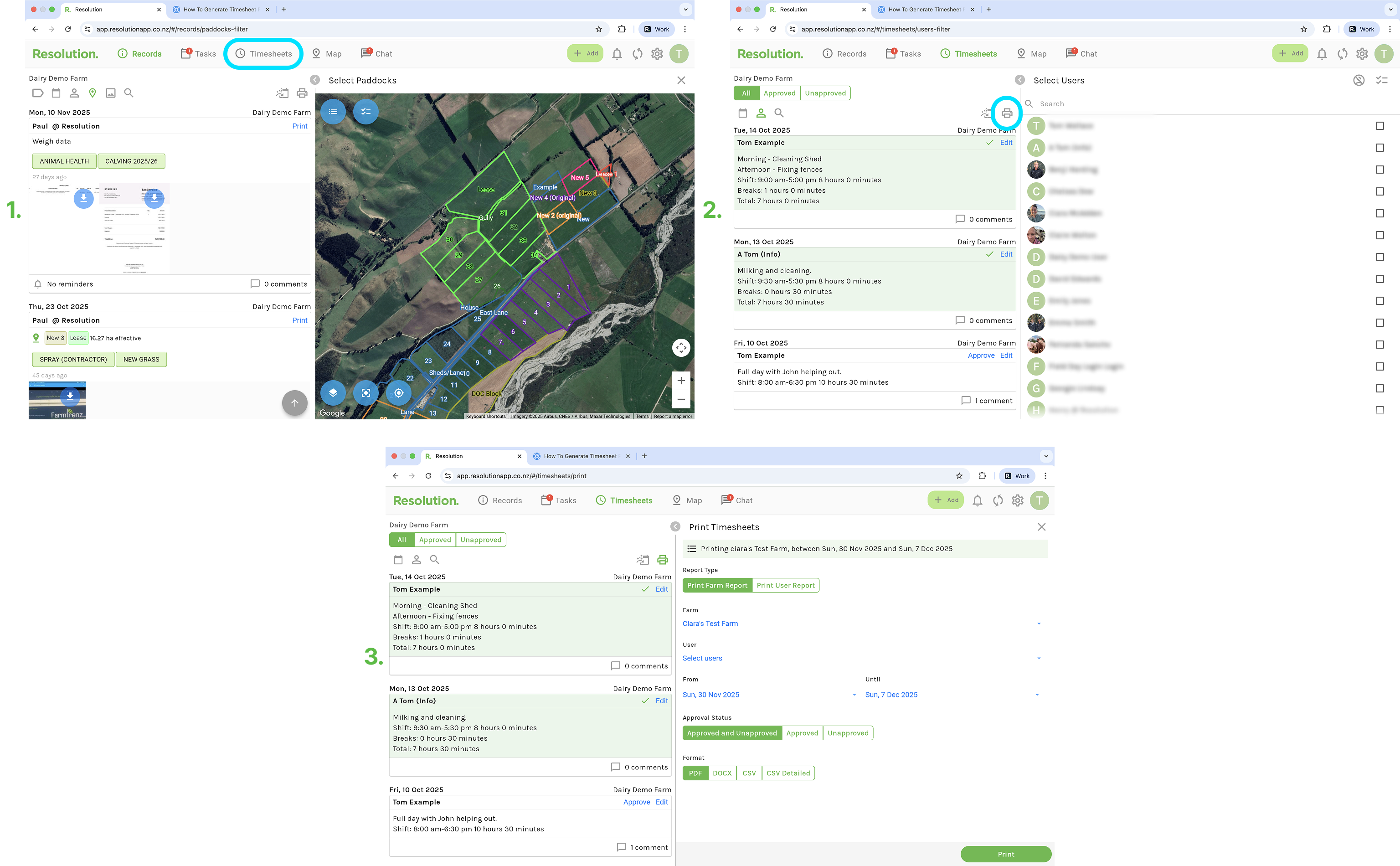


The steps to generate reports from your mobile app are the exact same as above.

timesheet reports create reports

Was this article helpful?

Yes
No
Give feedback about this article

Related Articles

  • User Permissions
  • How to Create a Timesheet
  • How to Approve Timesheets

Copyright 2026 – Top Rail Limited | All rights reserved

Expand