---
title: Print a Single Task
description: Learn how to generate a report for a single record or task, choose from all the options available, and print or save it.
---
[Skip to content](https://support.resolutionapp.co.nz/tasks/print-a-single-task#main-content)
English - New Zealand
Show submenu for translations
[](https://www.resolutionapp.co.nz/)
- [Home](https://www.resolutionapp.co.nz/)
- [About us](https://www.resolutionapp.co.nz/about-us)
- [Testimonials](https://www.resolutionapp.co.nz/testimonials)
- [Events](https://www.resolutionapp.co.nz/events)
- [Help Centre](https://support.resolutionapp.co.nz/)
- [Request a demo](https://www.resolutionapp.co.nz/pricing#request-demo)
Open main navigation
Close main navigation
- [Home](https://www.resolutionapp.co.nz/)
- [About us](https://www.resolutionapp.co.nz/about-us)
- [Testimonials](https://www.resolutionapp.co.nz/testimonials)
- [Events](https://www.resolutionapp.co.nz/events)
- [Help Centre](https://support.resolutionapp.co.nz/)
- [Request a demo](https://www.resolutionapp.co.nz/pricing#request-demo)
- English - New Zealand
Show submenu for translations
- [Login](https://app.resolutionapp.co.nz/)
[Login](https://app.resolutionapp.co.nz/)
How can we help you?
- There are no suggestions because the search field is empty.
1. [Resolution Help Centre](https://support.resolutionapp.co.nz/?hsLang=en-nz)
2. [Tasks](https://support.resolutionapp.co.nz/tasks?hsLang=en-nz)
# Print a Single Task
## Learn how to generate a report for a single record or task, choose from all the options available, and print or save it.
**NOTE:** You can generate a report on both your phone and desktop.
### Finding a Record and Choosing Your Options
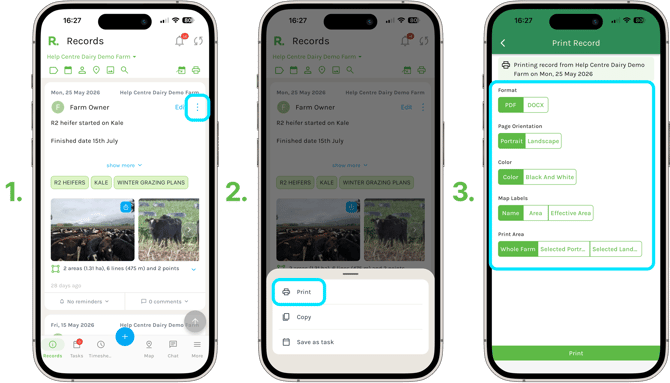
1. Find the record or task you want to print by scrolling through your timeline, or using the filter options at the top of the screen.
2. Select the three dots in the top right, then select Print from the menu.
The Print Record or Task screen gives you several options to personalise your report:
- Format — choose PDF or DOCX.
- Page Orientation — choose Portrait or Landscape.
- Colour — choose Colour or Black And White.
- Map Labels — if your report includes a farm map, choose the label to appear on it: Name, Area, Effective Area or none at all.
### Choosing Your Map Print Area
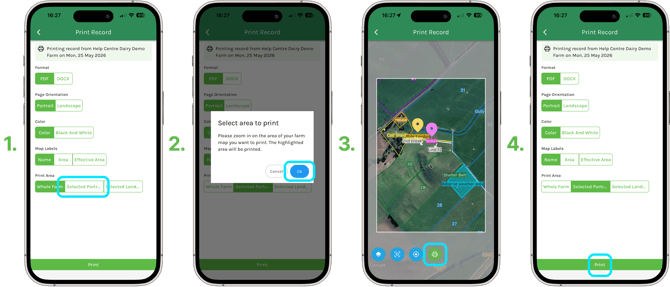
- Under Print Area, choose - Whole Farm, a Selected Portrait Area or Selected Landscape Area for a more precise view.
- If you choose a selected area, pan or zoom your map to find the view you want, then select Done.
- When you are ready, select Print.
### Downloading Your Report
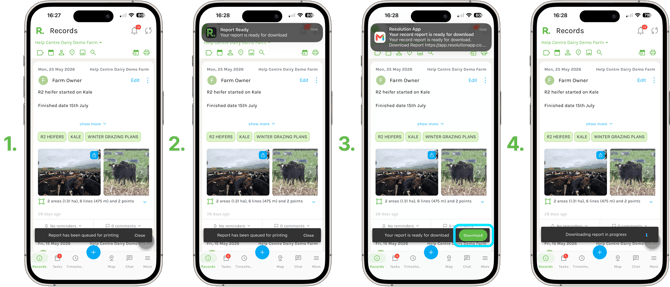
- A notification appears at the bottom of the screen confirming your report has been queued.
- Once it is ready, you will receive a notification in the app with a download link, and an email will also let you know it is ready.
- Select Download in the app to open your report.
### Viewing Your Report
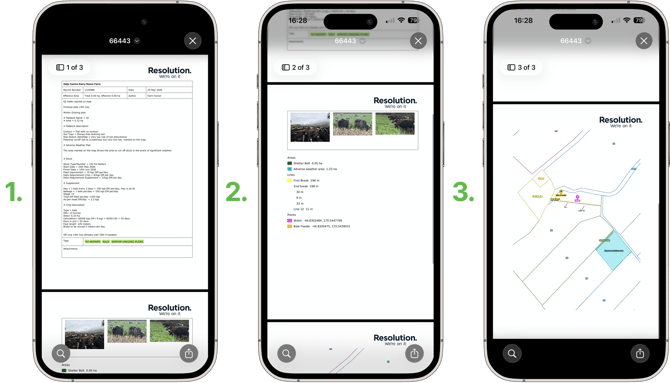
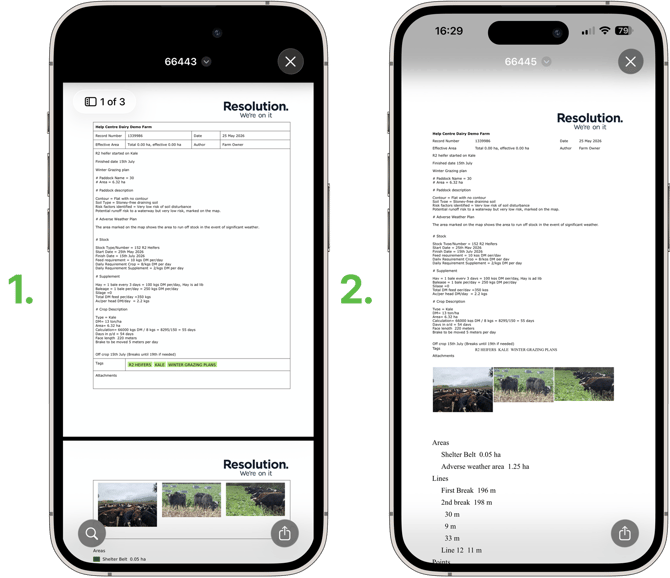
- Your report opens with all the relevant details from the record or task, including any attachments and map layer.
### PDF and Document Formats
- Depending on the format you chose, your report appears as a PDF or as a document.
- Both contain the same information — scroll to the bottom to see attachments, paddocks and map layers.
### Saving Your Report
#### On your phone:
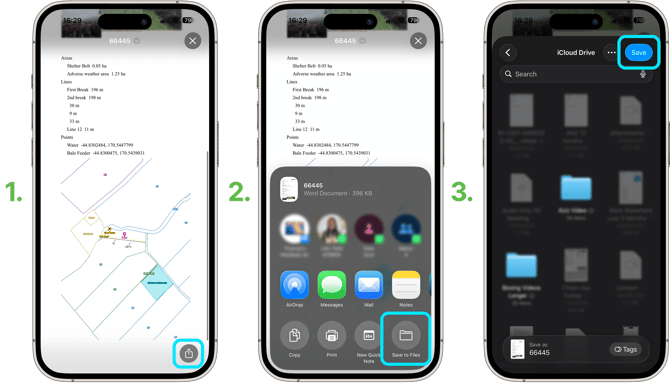
1. Select the share icon.
2. Select Save to Files.
3. Choose where you would like to save it, then select Save.
#### On desktop:
1. Select Download
2. Choose a name and location for the file and save it.
**NOTE:** From here you can print a physical copy, or share it with others by email.
**NOTE:** You can create a report for a task in exactly the same way.
### Related Articles
1. [How to Create and Print Reports](https://support.resolutionapp.co.nz/records/how-to-create-reports-and-print-them-records?hsLang=en-nz)
2. [Create a Record](https://support.resolutionapp.co.nz/records/create-a-record?hsLang=en-nz)
3. [Create a Task](https://support.resolutionapp.co.nz/tasks/create-a-task?hsLang=en-nz)
4. [Create Basic Map Layers](https://support.resolutionapp.co.nz/map-layers/create-basic-map-layers?hsLang=en-nz)
- [Getting started](https://support.resolutionapp.co.nz/getting-started?hsLang=en-nz)
- [Base Map](https://support.resolutionapp.co.nz/base-map?hsLang=en-nz#main-content)
- [Farm Base Map Editor](https://support.resolutionapp.co.nz/base-map?hsLang=en-nz#farm-base-map-editor)
- [Export Map](https://support.resolutionapp.co.nz/base-map?hsLang=en-nz#export-map)
- [Settings](https://support.resolutionapp.co.nz/settings?hsLang=en-nz#main-content)
- [User Settings](https://support.resolutionapp.co.nz/settings?hsLang=en-nz#user-settings)
- [Notifications](https://support.resolutionapp.co.nz/settings?hsLang=en-nz#notifications)
- [Account Settings](https://support.resolutionapp.co.nz/settings?hsLang=en-nz#account-settings)
- [Farm Settings](https://support.resolutionapp.co.nz/settings?hsLang=en-nz#farm-settings)
- [Tags](https://support.resolutionapp.co.nz/tags?hsLang=en-nz)
- [Records](https://support.resolutionapp.co.nz/records?hsLang=en-nz)
- [Tasks](https://support.resolutionapp.co.nz/tasks?hsLang=en-nz)
- [Map Layers](https://support.resolutionapp.co.nz/map-layers?hsLang=en-nz)
- [Timesheets](https://support.resolutionapp.co.nz/timesheets?hsLang=en-nz)
- [Chat](https://support.resolutionapp.co.nz/chat?hsLang=en-nz)
- [Tips & Tricks](https://support.resolutionapp.co.nz/tips-tricks?hsLang=en-nz)
- [Contact Support](https://www.resolutionapp.co.nz/support)
[](http://resolutionapp.co.nz)
Copyright 2026 - Top Rail Limited | All rights reserved
×