---
title: How to Create and Print Reports
description: Generate and print PDF or Word reports from your tasks timeline, using filters to select the exact entries you need.
---
[Skip to content](https://support.resolutionapp.co.nz/tasks/how-to-create-reports-and-print-them-tasks#main-content)
English - New Zealand
Show submenu for translations
[](https://www.resolutionapp.co.nz/)
- [Home](https://www.resolutionapp.co.nz/)
- [About us](https://www.resolutionapp.co.nz/about-us)
- [Testimonials](https://www.resolutionapp.co.nz/testimonials)
- [Events](https://www.resolutionapp.co.nz/events)
- [Help Centre](https://support.resolutionapp.co.nz/)
- [Request a demo](https://www.resolutionapp.co.nz/pricing#request-demo)
Open main navigation
Close main navigation
- [Home](https://www.resolutionapp.co.nz/)
- [About us](https://www.resolutionapp.co.nz/about-us)
- [Testimonials](https://www.resolutionapp.co.nz/testimonials)
- [Events](https://www.resolutionapp.co.nz/events)
- [Help Centre](https://support.resolutionapp.co.nz/)
- [Request a demo](https://www.resolutionapp.co.nz/pricing#request-demo)
- English - New Zealand
Show submenu for translations
- [Login](https://app.resolutionapp.co.nz/)
[Login](https://app.resolutionapp.co.nz/)
How can we help you?
- There are no suggestions because the search field is empty.
1. [Resolution Help Centre](https://support.resolutionapp.co.nz/?hsLang=en-nz)
2. [Tasks](https://support.resolutionapp.co.nz/tasks?hsLang=en-nz)
# How to Create and Print Reports
## Learn how to create reports and use the print function for your records and tasks. This can be done on mobile app or desktop.
### How to Print All Records/ Tasks
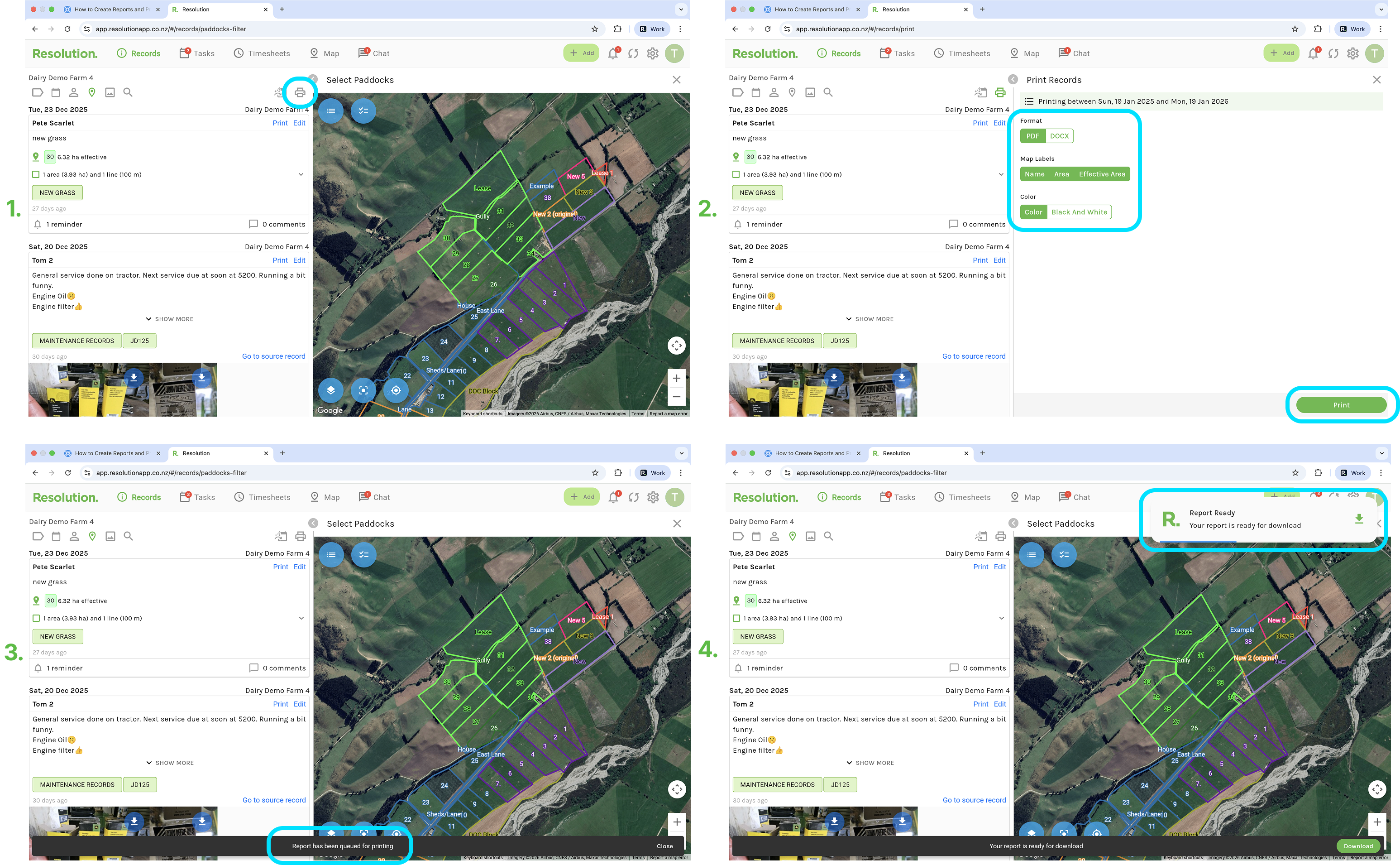
1. From your record or tasks page, select the printer icon.
2. Select your format: PDF or Word Document.
3. Select your map labels: Toggle on and off which map labels will be included in the report (Name, Area, or Effective Area)
4. Select a colour for the report being printed - Colour or Black and White
5. Select Print.
6. Resolution will then begin generating your report, you will receive an in app notification and an email when it is ready.
7. Click on either of these notifications when received.
8. To then save locally to your device, select the download button.
9. From here you can choose to print or share it with others via email, etc.
**NOTE:** This automatically generates a report for the previous year to date. For further options, please see below.
### Using Filters to Print Select Records/ Tasks
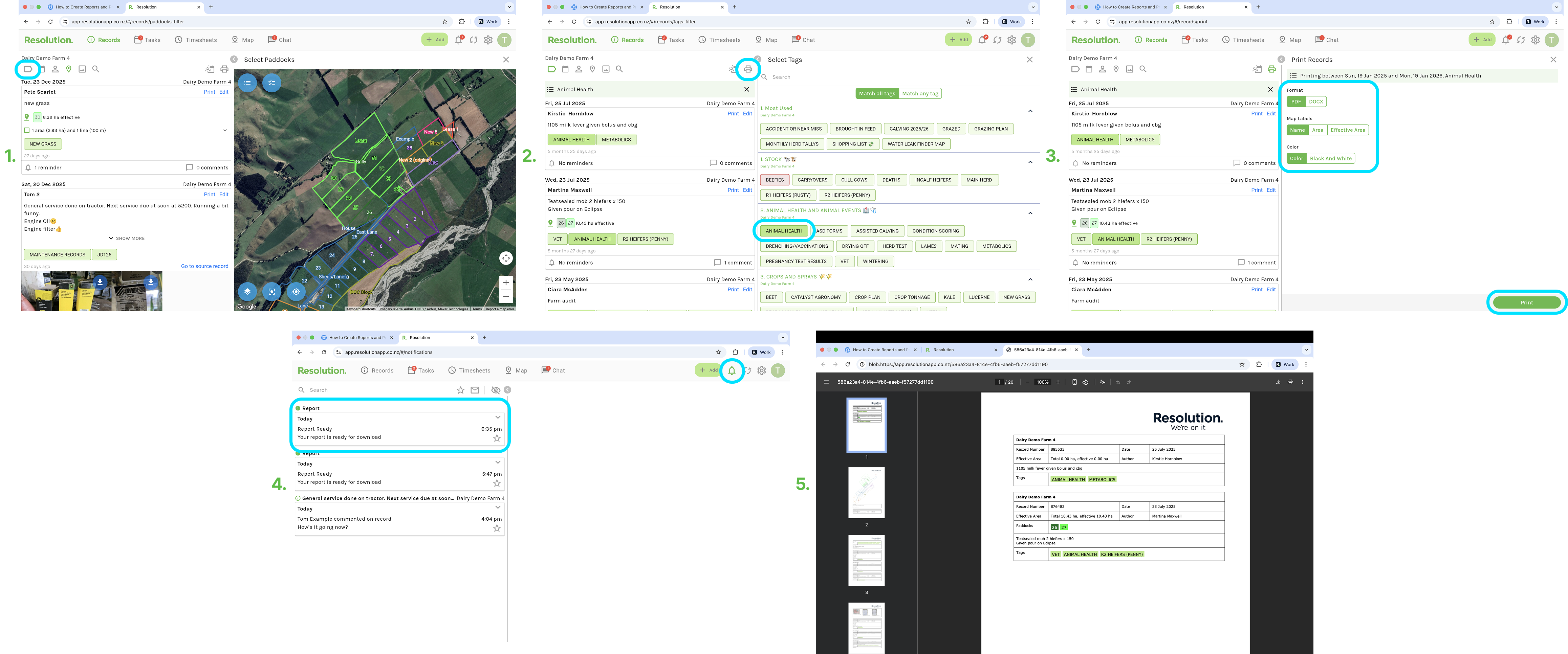
1. From your record or tasks page, use the available filters to narrow down your timeline (Filter by tag, date range, user, paddock, attachments included or key word or number).
2. Follow the same instructions under ‘Print All’ section above to print all the records/ tasks on the timeline using the filters.
### Related Articles
1. [Create a Task](https://support.resolutionapp.co.nz/tasks/create-a-task?hsLang=en-nz)
2. [Edit a Task](https://support.resolutionapp.co.nz/tasks/edit-a-task?hsLang=en-nz)
3. [Using the Filter by Date Function - Calendar Icon](https://support.resolutionapp.co.nz/tips-tricks/using-the-calendar-filter-by-date-function?hsLang=en-nz)
4. [Match All Tags vs Match Any Tag](https://support.resolutionapp.co.nz/tips-tricks/match-all-tags-vs-match-any-tag?hsLang=en-nz)
- [Getting started](https://support.resolutionapp.co.nz/getting-started?hsLang=en-nz)
- [Base Map](https://support.resolutionapp.co.nz/base-map?hsLang=en-nz#main-content)
- [Farm Base Map Editor](https://support.resolutionapp.co.nz/base-map?hsLang=en-nz#farm-base-map-editor)
- [Export Map](https://support.resolutionapp.co.nz/base-map?hsLang=en-nz#export-map)
- [Settings](https://support.resolutionapp.co.nz/settings?hsLang=en-nz#main-content)
- [User Settings](https://support.resolutionapp.co.nz/settings?hsLang=en-nz#user-settings)
- [Notifications](https://support.resolutionapp.co.nz/settings?hsLang=en-nz#notifications)
- [Account Settings](https://support.resolutionapp.co.nz/settings?hsLang=en-nz#account-settings)
- [Farm Settings](https://support.resolutionapp.co.nz/settings?hsLang=en-nz#farm-settings)
- [Tags](https://support.resolutionapp.co.nz/tags?hsLang=en-nz)
- [Records](https://support.resolutionapp.co.nz/records?hsLang=en-nz)
- [Tasks](https://support.resolutionapp.co.nz/tasks?hsLang=en-nz)
- [Map Layers](https://support.resolutionapp.co.nz/map-layers?hsLang=en-nz)
- [Timesheets](https://support.resolutionapp.co.nz/timesheets?hsLang=en-nz)
- [Chat](https://support.resolutionapp.co.nz/chat?hsLang=en-nz)
- [Tips & Tricks](https://support.resolutionapp.co.nz/tips-tricks?hsLang=en-nz)
- [Contact Support](https://www.resolutionapp.co.nz/support)
[](http://resolutionapp.co.nz)
Copyright 2026 - Top Rail Limited | All rights reserved
×