---
title: How to Delete Paddocks
description: Learn how to delete paddocks from your farm base map, understand the impact on attached records, and undo a deletion before saving.
---
[Skip to content](https://support.resolutionapp.co.nz/map-editor/micro-5-how-to-delete-paddocks#main-content)
English - New Zealand
Show submenu for translations
[](https://www.resolutionapp.co.nz/)
- [Home](https://www.resolutionapp.co.nz/)
- [About us](https://www.resolutionapp.co.nz/about-us)
- [Testimonials](https://www.resolutionapp.co.nz/testimonials)
- [Events](https://www.resolutionapp.co.nz/events)
- [Help Centre](https://support.resolutionapp.co.nz/)
- [Request a demo](https://www.resolutionapp.co.nz/pricing#request-demo)
Open main navigation
Close main navigation
- [Home](https://www.resolutionapp.co.nz/)
- [About us](https://www.resolutionapp.co.nz/about-us)
- [Testimonials](https://www.resolutionapp.co.nz/testimonials)
- [Events](https://www.resolutionapp.co.nz/events)
- [Help Centre](https://support.resolutionapp.co.nz/)
- [Request a demo](https://www.resolutionapp.co.nz/pricing#request-demo)
- English - New Zealand
Show submenu for translations
- [Login](https://app.resolutionapp.co.nz/)
[Login](https://app.resolutionapp.co.nz/)
How can we help you?
- There are no suggestions because the search field is empty.
1. [Resolution Help Centre](https://support.resolutionapp.co.nz/?hsLang=en-nz)
2. [Base Map](https://support.resolutionapp.co.nz/base-map?hsLang=en-nz)
3. [Farm Base Map Editor](https://support.resolutionapp.co.nz/base-map?hsLang=en-nz#farm-base-map-editor)
# How to Delete Paddocks
## Learn how to delete existing paddocks, also understand how this will effect your farms records attached to those paddocks.
**NOTE -** The permission levels required and how to access map editor instructions are in the previous lessons or click here - [How to Access Map Editor, Understanding Map Versions & Naming Map Version](https://support.resolutionapp.co.nz/how-to-access-map-editor-understanding-map-versions-naming-map-version?hsLang=en-nz)
### Steps To Delete A Paddock
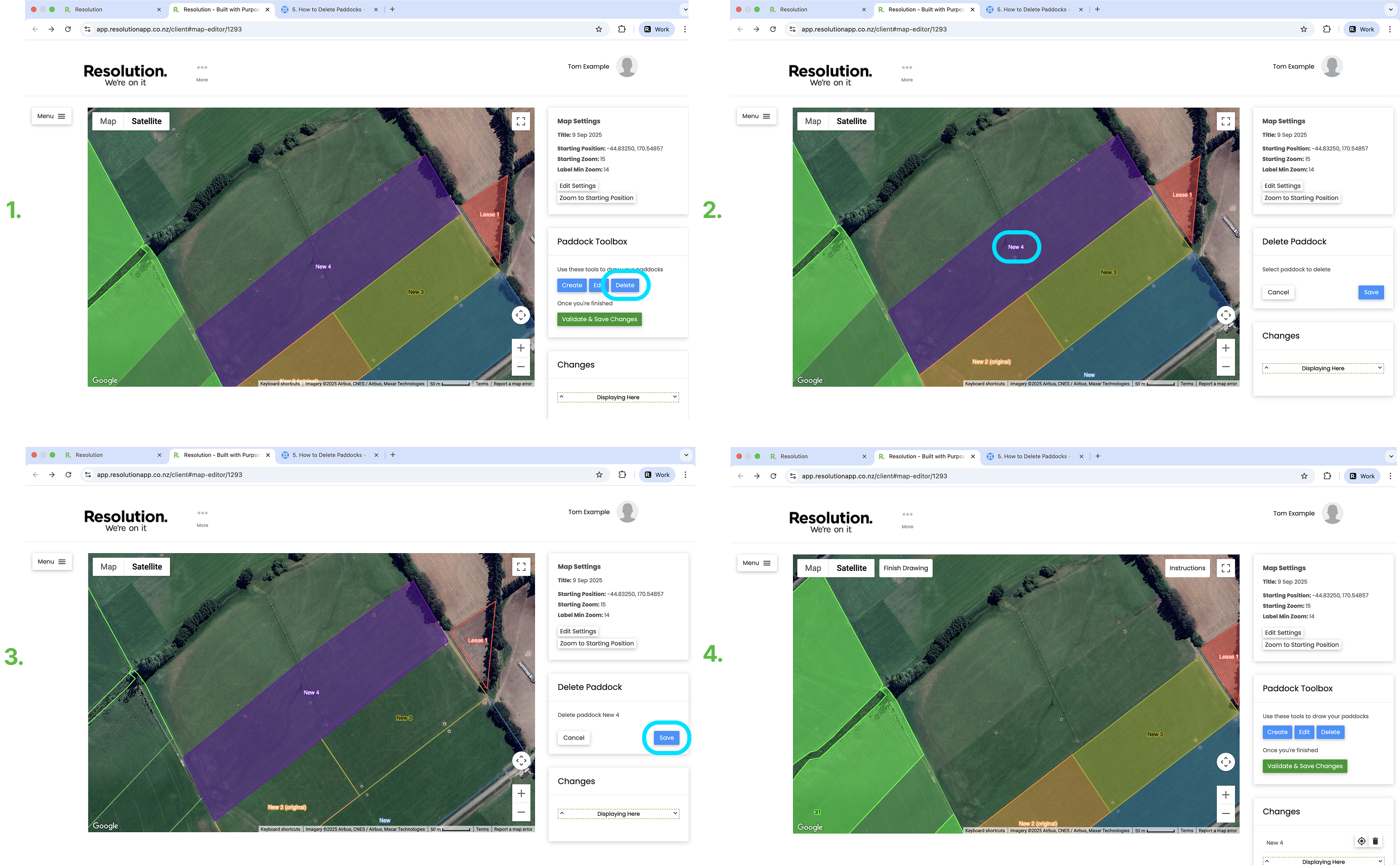
1. From the Paddock Toolbox window on the right of the screen - Select ‘Delete’
2. Click the paddock you wish to delete.
3. Select ‘Save’.
### Warning Before Deleting Paddock
- If you delete a paddock, all of the records that have been tagged and associated with that paddock will **NOT** be deleted. They will instead still be in the records timeline however not attached to that paddock. You will not be able to use the paddock filter to find these records.
- **Pro Tip:** If you delete a paddock - have not selected validate and save changes - and then decide you made a mistake - in the changes window (bottom right corner) you can select the bin icon next to the paddock name that you just deleted. This will revert/ undo your changes.
### Validate And Save Changes
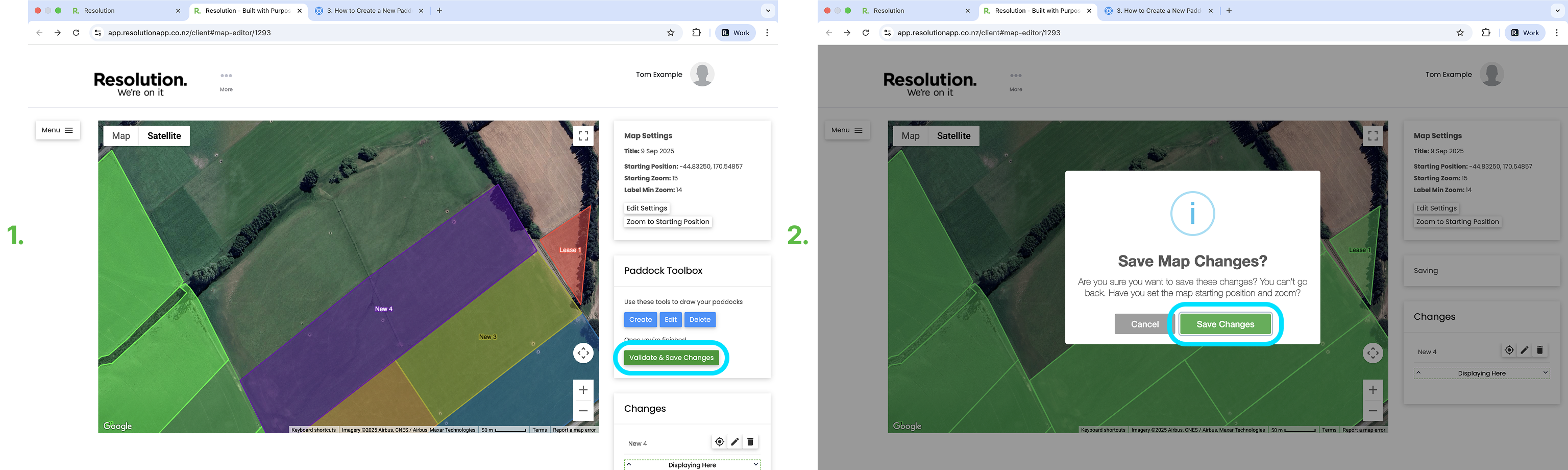
- After deleting your paddocks, you need to validate and save your changes.
- **Pro Tip:** We recommend only validating and saving your changes made to the map once at the end, after all your changes have been made.
- To do so, select ‘Validate & Save Changes’.
- Select ‘Save Changes’ to confirm.
- Users will then need to sync the app for these changes to be visible.
### [Related Articles](https://support.resolutionapp.co.nz/map-editor/micro-7-how-to-split-a-paddock?hsLang=en-nz)
1. [How to Edit Paddocks](https://support.resolutionapp.co.nz/map-editor/micro-4-how-to-edit-paddocks?hsLang=en-nz)
2. [How to Split a Paddock](https://support.resolutionapp.co.nz/map-editor/micro-7-how-to-split-a-paddock?hsLang=en-nz)
3. [How to Create a New Paddock](https://support.resolutionapp.co.nz/map-editor/micro-3-how-to-create-a-new-paddock?hsLang=en-nz)
4. [Validate and Save Changes & Fixing Validation Errors](https://support.resolutionapp.co.nz/map-editor/micro-6-validate-and-save-changes-fixing-validation-errors?hsLang=en-nz)
- [Getting started](https://support.resolutionapp.co.nz/getting-started?hsLang=en-nz)
- [Base Map](https://support.resolutionapp.co.nz/base-map?hsLang=en-nz#main-content)
- [Farm Base Map Editor](https://support.resolutionapp.co.nz/base-map?hsLang=en-nz#farm-base-map-editor)
- [Export Map](https://support.resolutionapp.co.nz/base-map?hsLang=en-nz#export-map)
- [Settings](https://support.resolutionapp.co.nz/settings?hsLang=en-nz#main-content)
- [User Settings](https://support.resolutionapp.co.nz/settings?hsLang=en-nz#user-settings)
- [Notifications](https://support.resolutionapp.co.nz/settings?hsLang=en-nz#notifications)
- [Account Settings](https://support.resolutionapp.co.nz/settings?hsLang=en-nz#account-settings)
- [Farm Settings](https://support.resolutionapp.co.nz/settings?hsLang=en-nz#farm-settings)
- [Tags](https://support.resolutionapp.co.nz/tags?hsLang=en-nz)
- [Records](https://support.resolutionapp.co.nz/records?hsLang=en-nz)
- [Tasks](https://support.resolutionapp.co.nz/tasks?hsLang=en-nz)
- [Map Layers](https://support.resolutionapp.co.nz/map-layers?hsLang=en-nz)
- [Timesheets](https://support.resolutionapp.co.nz/timesheets?hsLang=en-nz)
- [Chat](https://support.resolutionapp.co.nz/chat?hsLang=en-nz)
- [Tips & Tricks](https://support.resolutionapp.co.nz/tips-tricks?hsLang=en-nz)
- [Contact Support](https://www.resolutionapp.co.nz/support)
[](http://resolutionapp.co.nz)
Copyright 2026 - Top Rail Limited | All rights reserved
×