---
title: Export Map
description: Export and download your farm map from Resolution as a zip file. Access current and archived map versions on both mobile and desktop.
---
[Skip to content](https://support.resolutionapp.co.nz/export-map/export-map-video#main-content)
English - New Zealand
Show submenu for translations
[](https://www.resolutionapp.co.nz/)
- [Home](https://www.resolutionapp.co.nz/)
- [About us](https://www.resolutionapp.co.nz/about-us)
- [Testimonials](https://www.resolutionapp.co.nz/testimonials)
- [Events](https://www.resolutionapp.co.nz/events)
- [Help Centre](https://support.resolutionapp.co.nz/)
- [Request a demo](https://www.resolutionapp.co.nz/pricing#request-demo)
Open main navigation
Close main navigation
- [Home](https://www.resolutionapp.co.nz/)
- [About us](https://www.resolutionapp.co.nz/about-us)
- [Testimonials](https://www.resolutionapp.co.nz/testimonials)
- [Events](https://www.resolutionapp.co.nz/events)
- [Help Centre](https://support.resolutionapp.co.nz/)
- [Request a demo](https://www.resolutionapp.co.nz/pricing#request-demo)
- English - New Zealand
Show submenu for translations
- [Login](https://app.resolutionapp.co.nz/)
[Login](https://app.resolutionapp.co.nz/)
How can we help you?
- There are no suggestions because the search field is empty.
1. [Resolution Help Centre](https://support.resolutionapp.co.nz/?hsLang=en-nz)
2. [Base Map](https://support.resolutionapp.co.nz/base-map?hsLang=en-nz)
3. [Export Map](https://support.resolutionapp.co.nz/base-map?hsLang=en-nz#export-map)
# Export Map
## Learn how to export your farms map out of Resolution. Download your farm map as a zip file to share with contractors or use in mapping software.
### Steps to Export Map - Mobile
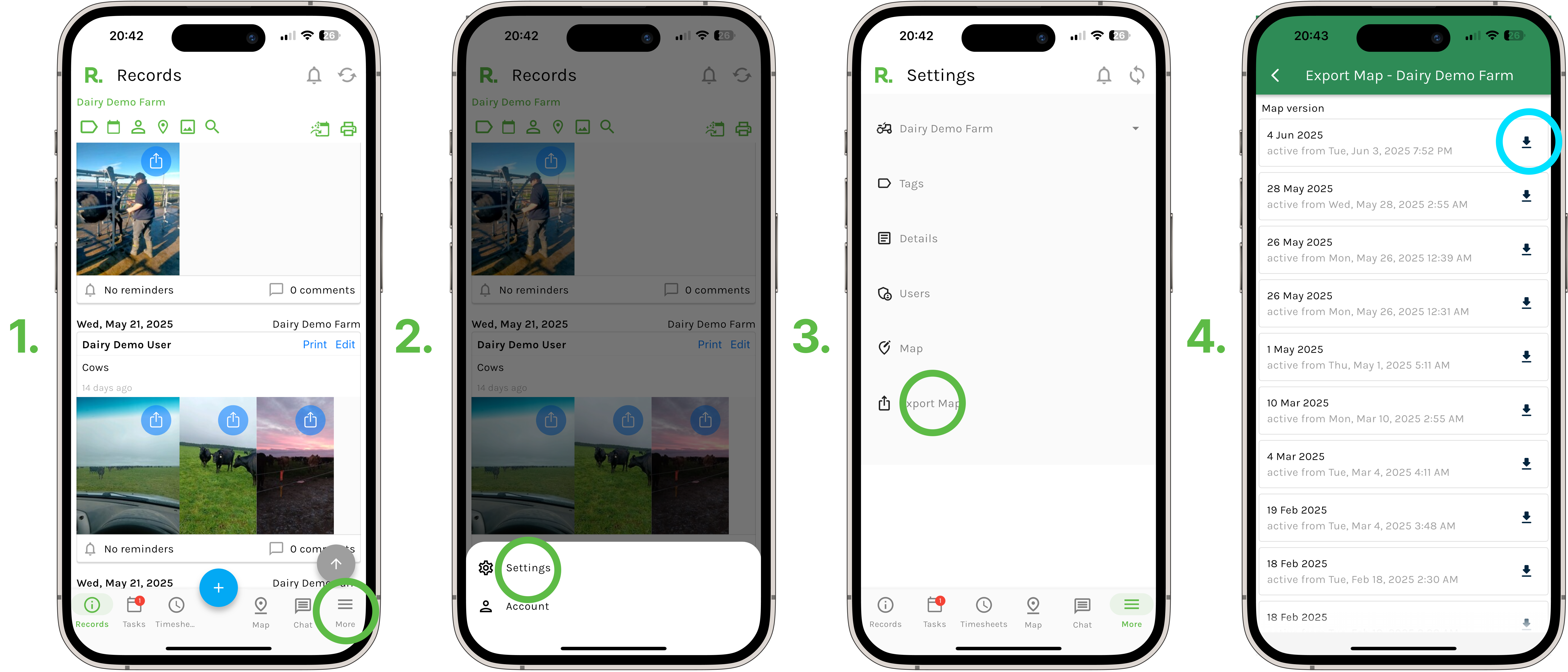
1. Select ‘more’ in the bottom right hand corner of your screen.
2. Select ‘settings’.
3. Select ‘Export Map’.
4. Select "Download map version' on the map you wish to download.
5. The most recent entry is your current map you are using. All other entries are previous map versions that have been saved and archived.
### Steps to Export Map - Desktop
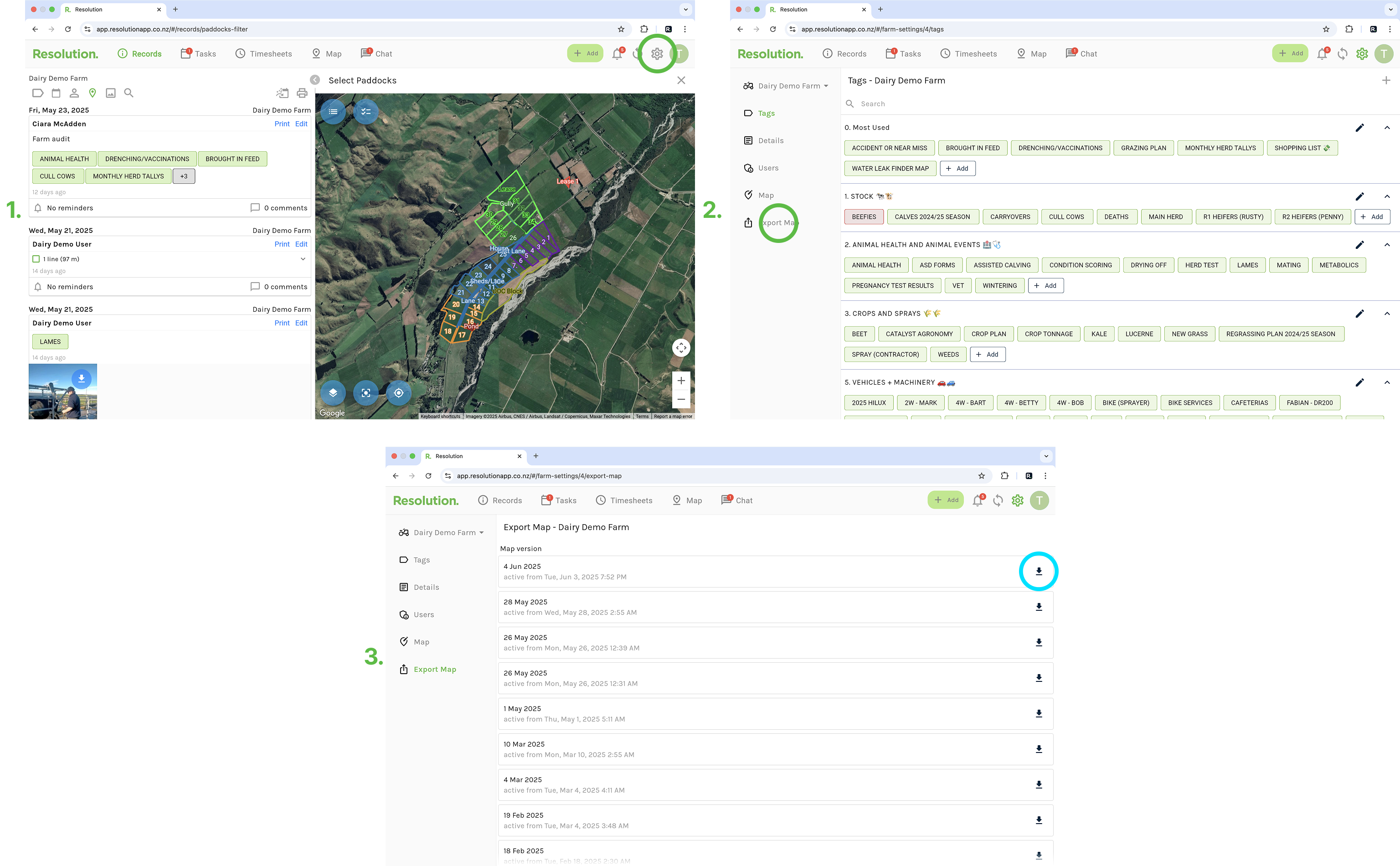
1. Select ‘settings’.
2. Select ‘Export Map’.
3. Select "Download map version' on the map you wish to download.
4. The most recent entry is your current map you are using. All other entries are previous map versions that have been saved and archived.
### Best Practices
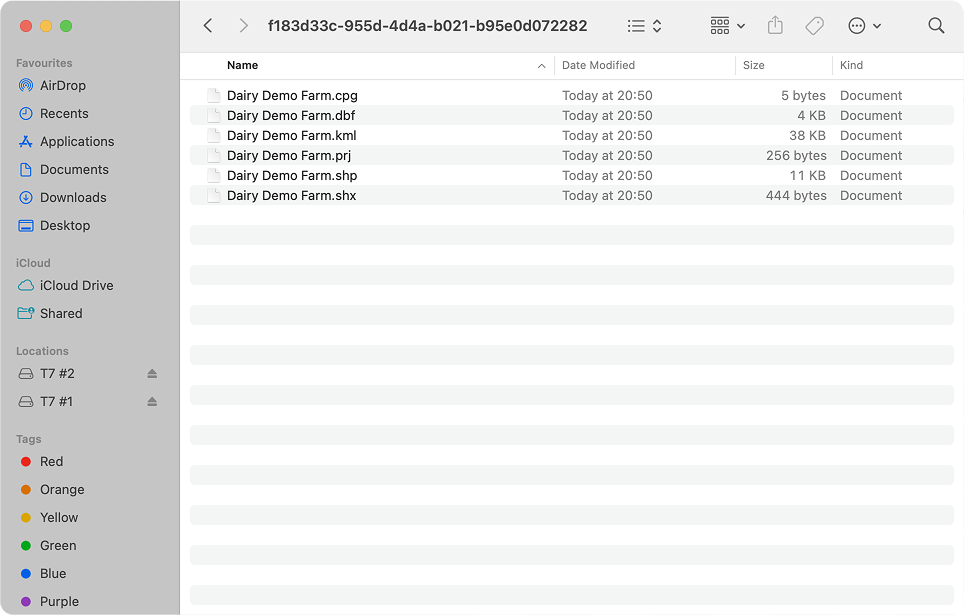
- Your farm map will download as a zip file.
- Open this file and you will see the different file types of your farm map.
- You will not be able to open and view the contents of these files without mapping software, but they can be emailed or shared to others (such as contractors, etc.) who will be able to upload the file to their software.
### Related Articles
1. [How to Edit Your Farms Base Map - Full Walkthrough](https://support.resolutionapp.co.nz/how-to-edit-your-farms-base-map-full-walkthrough?hsLang=en-nz)
2. [How to Create a New Paddock](https://support.resolutionapp.co.nz/map-editor/micro-3-how-to-create-a-new-paddock?hsLang=en-nz)
3. [How to Edit Paddocks](https://support.resolutionapp.co.nz/map-editor/micro-4-how-to-edit-paddocks?hsLang=en-nz)
4. [How to Split a Paddock](https://support.resolutionapp.co.nz/map-editor/micro-7-how-to-split-a-paddock?hsLang=en-nz)
- [Getting started](https://support.resolutionapp.co.nz/getting-started?hsLang=en-nz)
- [Base Map](https://support.resolutionapp.co.nz/base-map?hsLang=en-nz#main-content)
- [Farm Base Map Editor](https://support.resolutionapp.co.nz/base-map?hsLang=en-nz#farm-base-map-editor)
- [Export Map](https://support.resolutionapp.co.nz/base-map?hsLang=en-nz#export-map)
- [Settings](https://support.resolutionapp.co.nz/settings?hsLang=en-nz#main-content)
- [User Settings](https://support.resolutionapp.co.nz/settings?hsLang=en-nz#user-settings)
- [Notifications](https://support.resolutionapp.co.nz/settings?hsLang=en-nz#notifications)
- [Account Settings](https://support.resolutionapp.co.nz/settings?hsLang=en-nz#account-settings)
- [Farm Settings](https://support.resolutionapp.co.nz/settings?hsLang=en-nz#farm-settings)
- [Tags](https://support.resolutionapp.co.nz/tags?hsLang=en-nz)
- [Records](https://support.resolutionapp.co.nz/records?hsLang=en-nz)
- [Tasks](https://support.resolutionapp.co.nz/tasks?hsLang=en-nz)
- [Map Layers](https://support.resolutionapp.co.nz/map-layers?hsLang=en-nz)
- [Timesheets](https://support.resolutionapp.co.nz/timesheets?hsLang=en-nz)
- [Chat](https://support.resolutionapp.co.nz/chat?hsLang=en-nz)
- [Tips & Tricks](https://support.resolutionapp.co.nz/tips-tricks?hsLang=en-nz)
- [Contact Support](https://www.resolutionapp.co.nz/support)
[](http://resolutionapp.co.nz)
Copyright 2026 - Top Rail Limited | All rights reserved
×