---
title: Chat Reactions
description: React to chat messages with emojis on mobile and desktop, and see who reacted to your messages via Message Info.
---
[Skip to content](https://support.resolutionapp.co.nz/chat/chat-reactions#main-content)
English - New Zealand
Show submenu for translations
[](https://www.resolutionapp.co.nz/)
- [Home](https://www.resolutionapp.co.nz/)
- [About us](https://www.resolutionapp.co.nz/about-us)
- [Testimonials](https://www.resolutionapp.co.nz/testimonials)
- [Events](https://www.resolutionapp.co.nz/events)
- [Help Centre](https://support.resolutionapp.co.nz/)
- [Request a demo](https://www.resolutionapp.co.nz/pricing#request-demo)
Open main navigation
Close main navigation
- [Home](https://www.resolutionapp.co.nz/)
- [About us](https://www.resolutionapp.co.nz/about-us)
- [Testimonials](https://www.resolutionapp.co.nz/testimonials)
- [Events](https://www.resolutionapp.co.nz/events)
- [Help Centre](https://support.resolutionapp.co.nz/)
- [Request a demo](https://www.resolutionapp.co.nz/pricing#request-demo)
- English - New Zealand
Show submenu for translations
- [Login](https://app.resolutionapp.co.nz/)
[Login](https://app.resolutionapp.co.nz/)
How can we help you?
- There are no suggestions because the search field is empty.
1. [Resolution Help Centre](https://support.resolutionapp.co.nz/?hsLang=en-nz)
2. [Chat](https://support.resolutionapp.co.nz/chat?hsLang=en-nz)
# Chat Reactions
## Learn how to react to messages within your chat groups. Add emoji reactions to chat messages and view who reacted, with what, and when.
### How to React to Messages - Mobile
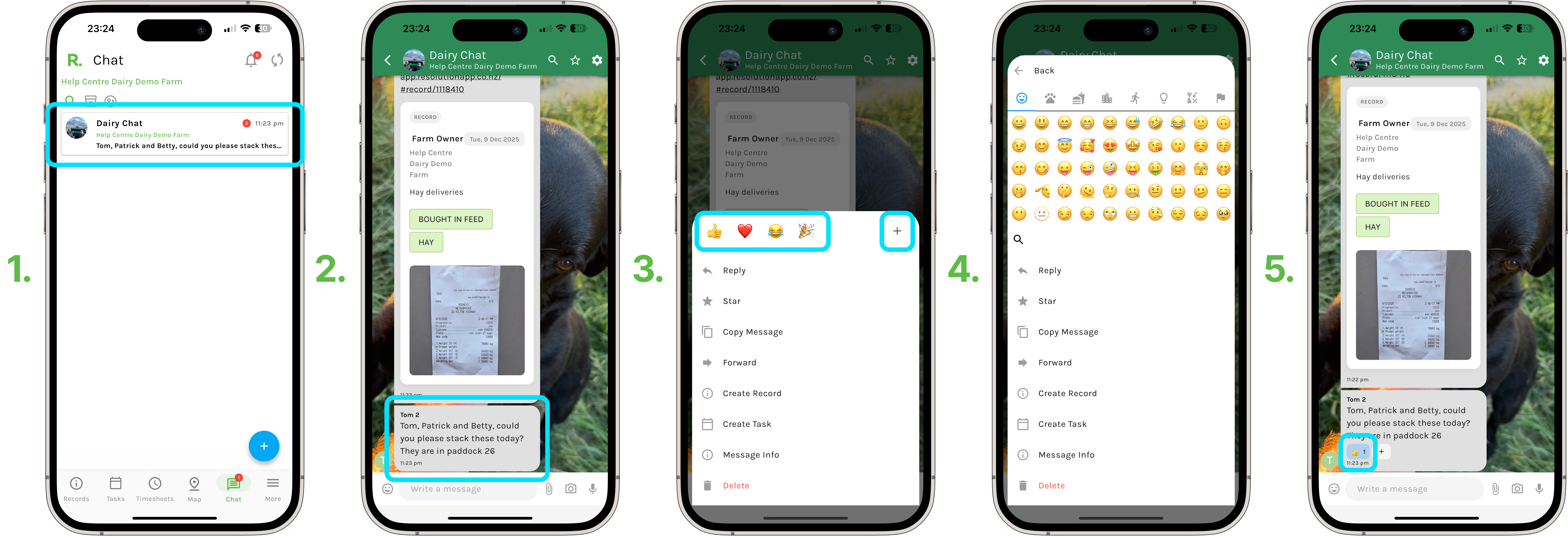
1. Select your chat.
2. Identify the message you wish to react to, press and hold on that message.
3. Select from one of the preset emojis to react with, or select the plus sign to view all the emojis available to react with.
4. Simply select an emoji, and now you have reacted to a message.
5. The user who sent the message will be notified that their message has been reacted to.
### How to React to Messages - Desktop
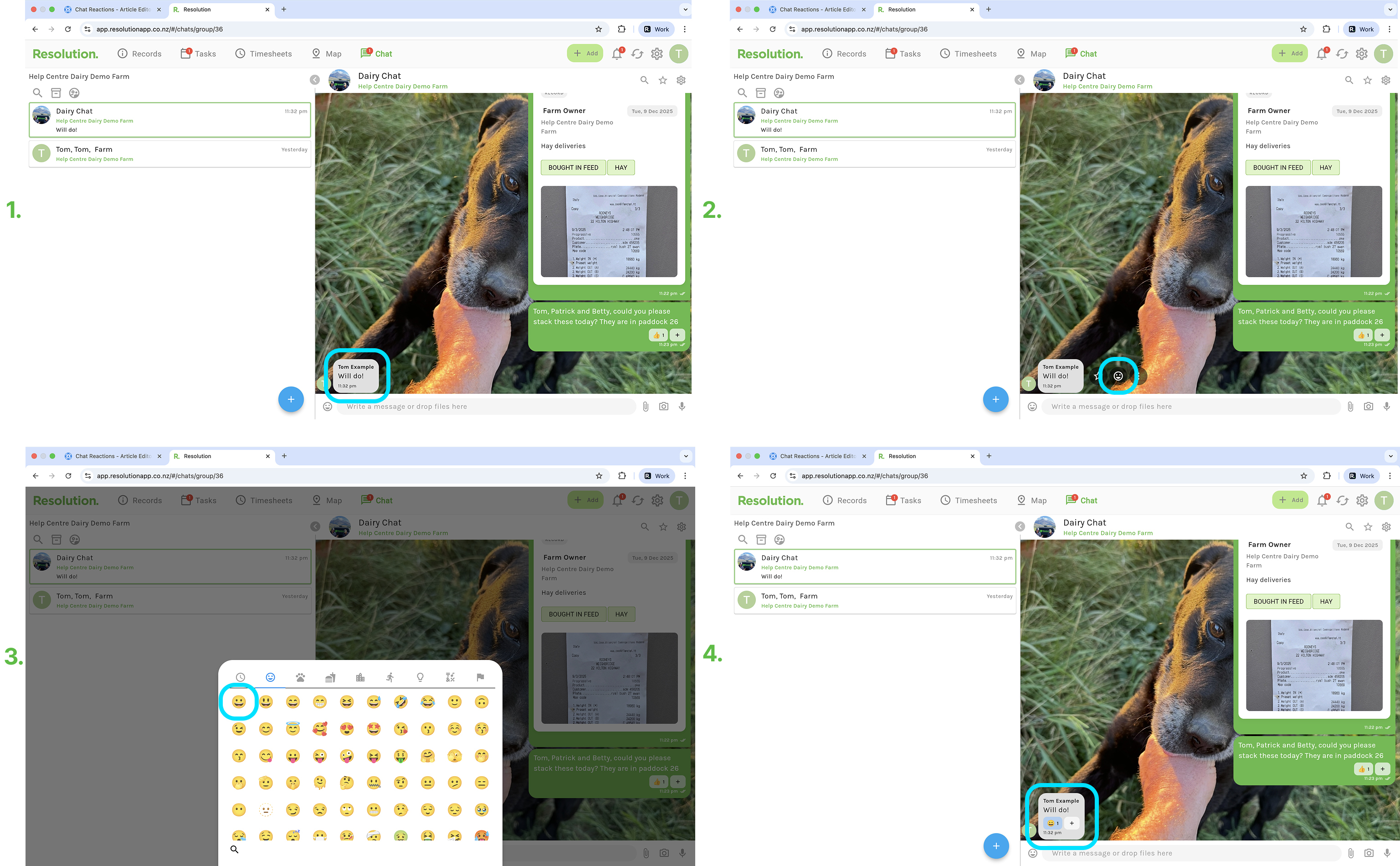
1. Hover your cursor over the message you wish to react to.
2. Select ‘React’ (the smiley face).
3. Select an emoji to react with.
4. You have now have reacted to a message.
5. The user who sent the message will be notified that their message has been reacted to.
### Chat Reaction Notifications / Information
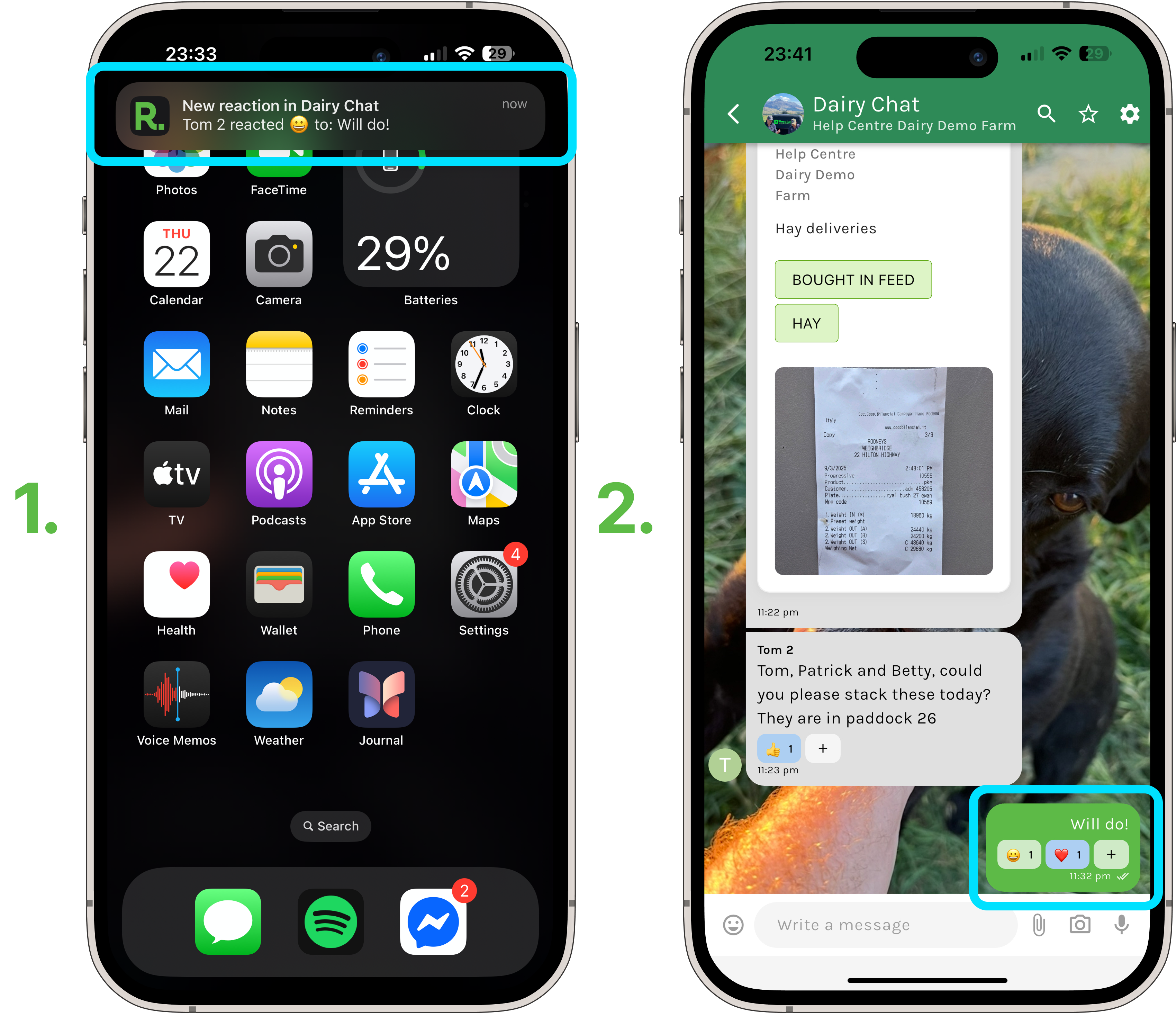
- When you react to a message, the message sender will be notified and vice versa - if someone reacts to a message you have sent, you receive a notification.
- You can react to all messages within your Chat groups, including your own.
- **Pro Tip -** To view all reactions to your message (who reacted, with what, and when) - Simply click and hold on the message on mobile, or select the three dots on desktop, and then select “Message Info” from the menu.
### Related Articles
1. [Getting Started (Chat)](https://support.resolutionapp.co.nz/chat/chat-getting-started?hsLang=en-nz)
2. [Create New Chats](https://support.resolutionapp.co.nz/chat/create-new-chats?hsLang=en-nz)
3. [Basic Chat Functions](https://support.resolutionapp.co.nz/chat/basic-chat-functions?hsLang=en-nz)
4. [Attach Records / Tasks to Chat and How to Create Records / Tasks from Chat](https://support.resolutionapp.co.nz/chat/attaching-records-and-tasks-to-chat-how-to-create-records-and-tasks-from-chat?hsLang=en-nz)
- [Getting started](https://support.resolutionapp.co.nz/getting-started?hsLang=en-nz)
- [Base Map](https://support.resolutionapp.co.nz/base-map?hsLang=en-nz#main-content)
- [Farm Base Map Editor](https://support.resolutionapp.co.nz/base-map?hsLang=en-nz#farm-base-map-editor)
- [Export Map](https://support.resolutionapp.co.nz/base-map?hsLang=en-nz#export-map)
- [Settings](https://support.resolutionapp.co.nz/settings?hsLang=en-nz#main-content)
- [User Settings](https://support.resolutionapp.co.nz/settings?hsLang=en-nz#user-settings)
- [Notifications](https://support.resolutionapp.co.nz/settings?hsLang=en-nz#notifications)
- [Account Settings](https://support.resolutionapp.co.nz/settings?hsLang=en-nz#account-settings)
- [Farm Settings](https://support.resolutionapp.co.nz/settings?hsLang=en-nz#farm-settings)
- [Tags](https://support.resolutionapp.co.nz/tags?hsLang=en-nz)
- [Records](https://support.resolutionapp.co.nz/records?hsLang=en-nz)
- [Tasks](https://support.resolutionapp.co.nz/tasks?hsLang=en-nz)
- [Map Layers](https://support.resolutionapp.co.nz/map-layers?hsLang=en-nz)
- [Timesheets](https://support.resolutionapp.co.nz/timesheets?hsLang=en-nz)
- [Chat](https://support.resolutionapp.co.nz/chat?hsLang=en-nz)
- [Tips & Tricks](https://support.resolutionapp.co.nz/tips-tricks?hsLang=en-nz)
- [Contact Support](https://www.resolutionapp.co.nz/support)
[](http://resolutionapp.co.nz)
Copyright 2026 - Top Rail Limited | All rights reserved
×