---
title: Attach Records / Tasks to Chat and How to Create Records / Tasks from Chat
description: Learn how to attach existing records and tasks to a chat message, and create new records or tasks directly from a conversation.
---
[Skip to content](https://support.resolutionapp.co.nz/chat/attaching-records-and-tasks-to-chat-how-to-create-records-and-tasks-from-chat#main-content)
English - New Zealand
Show submenu for translations
[](https://www.resolutionapp.co.nz/)
- [Home](https://www.resolutionapp.co.nz/)
- [About us](https://www.resolutionapp.co.nz/about-us)
- [Testimonials](https://www.resolutionapp.co.nz/testimonials)
- [Events](https://www.resolutionapp.co.nz/events)
- [Help Centre](https://support.resolutionapp.co.nz/)
- [Request a demo](https://www.resolutionapp.co.nz/pricing#request-demo)
Open main navigation
Close main navigation
- [Home](https://www.resolutionapp.co.nz/)
- [About us](https://www.resolutionapp.co.nz/about-us)
- [Testimonials](https://www.resolutionapp.co.nz/testimonials)
- [Events](https://www.resolutionapp.co.nz/events)
- [Help Centre](https://support.resolutionapp.co.nz/)
- [Request a demo](https://www.resolutionapp.co.nz/pricing#request-demo)
- English - New Zealand
Show submenu for translations
- [Login](https://app.resolutionapp.co.nz/)
[Login](https://app.resolutionapp.co.nz/)
How can we help you?
- There are no suggestions because the search field is empty.
1. [Resolution Help Centre](https://support.resolutionapp.co.nz/?hsLang=en-nz)
2. [Chat](https://support.resolutionapp.co.nz/chat?hsLang=en-nz)
# Attach Records / Tasks to Chat and How to Create Records / Tasks from Chat
## Learn how to attach existing records and tasks into the chat. Also learn how to create new records and tasks from existing chat messages.
### Steps to Attach Record or Task to Chat
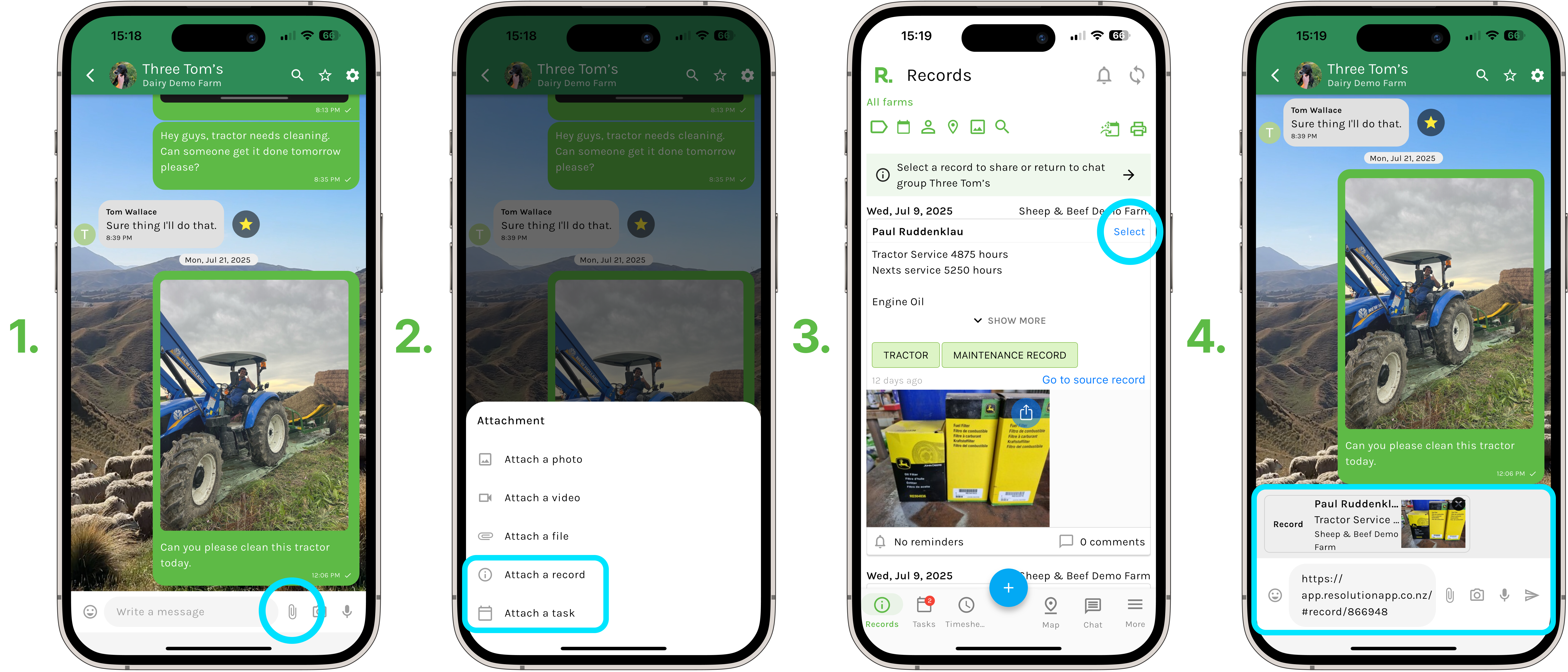
- Select the add attachment/paperclip icon to the right of ‘Write a message’.
- Select either ‘Attach a record’ or ‘Attach a task’.
- Scroll through the record or task timelines, you can use all the filters available to narrow down your search to identify the record or task you wish to attach.
- Select the ‘select’ button next to the record or task.
- Add a written message or any other attachments to the message before sending.
### Steps to Create Record or Task from Chat
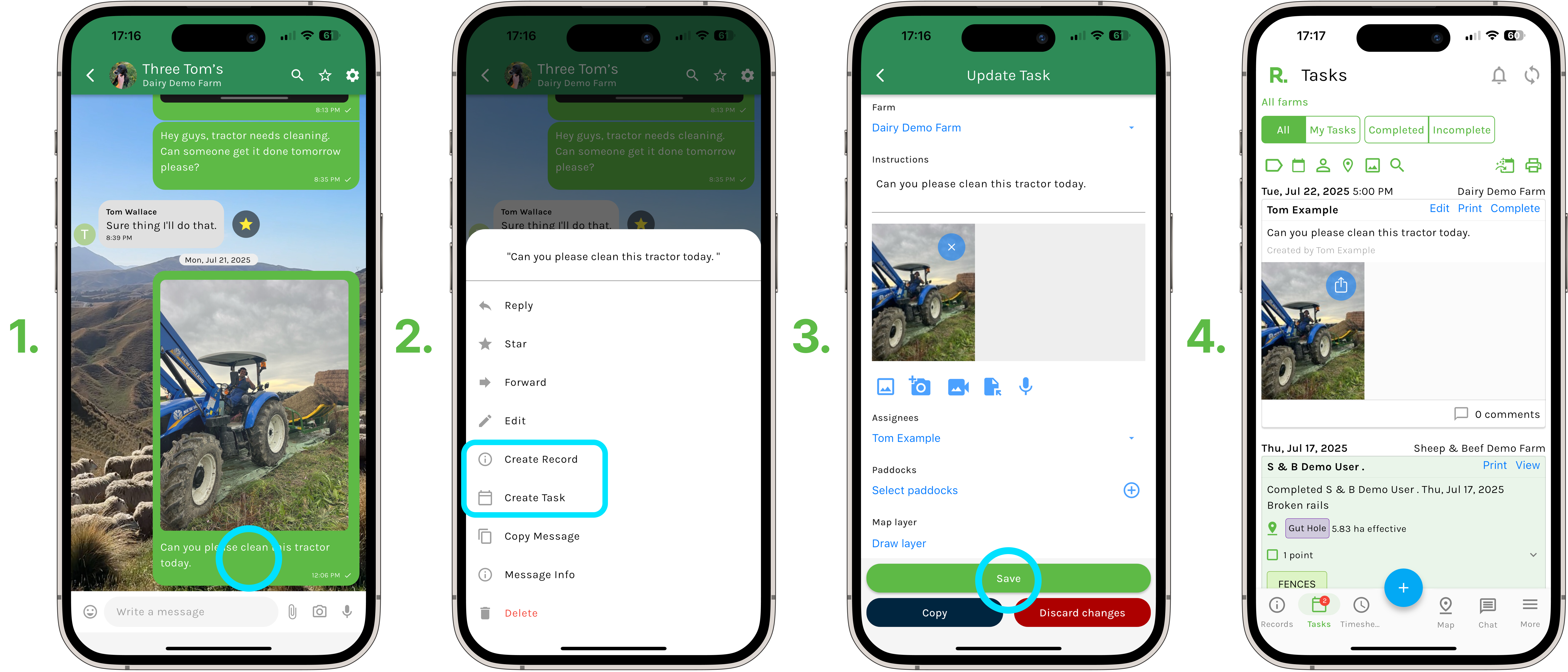
- To create a record or task from chat either -
- On mobile - long press on your own or another user's message to bring up the menu.
- On desktop - hover your cursor over the message and select the three dots to bring up the menu.
- Select ‘Create record’ or ‘Create task’.
- All of the information contained in the original message will automatically transfer to the new record or task and populate the fields. The written message will go into the description/ instructions and any attachments such as photos will be included with the new record or task.
- Now go through and continue adding the rest of the components to the record or task, such as assignees, tags, due dates etc.
- Select ‘Save’.
### Related Articles
1. [Basic Chat Functions](https://support.resolutionapp.co.nz/chat/basic-chat-functions?hsLang=en-nz)
2. [Create New Chats](https://support.resolutionapp.co.nz/chat/create-new-chats?hsLang=en-nz)
3. [Chat Permissions](https://support.resolutionapp.co.nz/chat/chat-permissions?hsLang=en-nz)
4. [Chat Full Walkthrough](https://support.resolutionapp.co.nz/chat/chat-full-walkthrough?hsLang=en-nz)
- [Getting started](https://support.resolutionapp.co.nz/getting-started?hsLang=en-nz)
- [Base Map](https://support.resolutionapp.co.nz/base-map?hsLang=en-nz#main-content)
- [Farm Base Map Editor](https://support.resolutionapp.co.nz/base-map?hsLang=en-nz#farm-base-map-editor)
- [Export Map](https://support.resolutionapp.co.nz/base-map?hsLang=en-nz#export-map)
- [Settings](https://support.resolutionapp.co.nz/settings?hsLang=en-nz#main-content)
- [User Settings](https://support.resolutionapp.co.nz/settings?hsLang=en-nz#user-settings)
- [Notifications](https://support.resolutionapp.co.nz/settings?hsLang=en-nz#notifications)
- [Account Settings](https://support.resolutionapp.co.nz/settings?hsLang=en-nz#account-settings)
- [Farm Settings](https://support.resolutionapp.co.nz/settings?hsLang=en-nz#farm-settings)
- [Tags](https://support.resolutionapp.co.nz/tags?hsLang=en-nz)
- [Records](https://support.resolutionapp.co.nz/records?hsLang=en-nz)
- [Tasks](https://support.resolutionapp.co.nz/tasks?hsLang=en-nz)
- [Map Layers](https://support.resolutionapp.co.nz/map-layers?hsLang=en-nz)
- [Timesheets](https://support.resolutionapp.co.nz/timesheets?hsLang=en-nz)
- [Chat](https://support.resolutionapp.co.nz/chat?hsLang=en-nz)
- [Tips & Tricks](https://support.resolutionapp.co.nz/tips-tricks?hsLang=en-nz)
- [Contact Support](https://www.resolutionapp.co.nz/support)
[](http://resolutionapp.co.nz)
Copyright 2026 - Top Rail Limited | All rights reserved
×